Showing posts with label Writing Software. Show all posts

Sunday

The Top Ten Reasons I Love Scrivener

In February of this year I was introduced to a software writing program called Scrivener. A fellow writer, who is as Attention Deficit as I am, said the program has been instrumental in helping him keep his novel organized. I was already 2/3 of the way through my own novel The Witches of Dark Root, but the plot was getting deeper and more complex than I had originally anticipated. My friend assured me that Scrivener would keep me on track, especially if I planned to write sequels (which I did), so I gave it a try. My only regret now is that I I hadn’t written my entire book using this program.

Here are the top ten reasons I love Scrivener.

SONAR 3 - Submission Tracking Software

The submission tracking software Sonar 3 is available from Spacejock Software. Best news is it is still free!
Sonar is a manuscript submission tracking program, and I wrote it because I was going nuts keeping track of short story submissions. This program tells me which market has each story, whether a story has been sold or rejected and which stories are gathering dust instead of earning their keep. If you decide to use it, you will be able to view a list of all your stories and then filter them in various ways (e.g. only show stories which are available to send out). You can add markets, stories and submissions and best of all it's completely free!
New features include the following:


  • Can be installed and run alongside Sonar 2
  • Import Sonar2 data without messing up the original
  • Load, use, save as many different databases as you want
  • 'Stories' now called 'works', so non-fic writers can use the prog
  • You can double-click entries in any list to view details
  • Color coded result lines
  • Text fields now have unlimited length - guidelines, comments, feedback, etc
  • List subs by work AND by market (e.g. a list of everything sent to F&SF)
  • All lists can be sorted - including by date
  • All forms are resizable
  • Now written in .NET 2.0
  • Entire project stored in a single XML data file
  • Automatic daily backups

Friday

Scrivener Can Export To Many Different File Formats

    So you're wondering what formats Scrivener can export to? Scrivener allows you to take one large document, or combination of small ones, and compile them into a multitude of formats.  The following is taken from the Scrivener Users Manual (there are links at the bottom of the page).
The main purpose of Scrivener is to provide a place that will help you write a long piece of text (whether novel, thesis or factual book), which may be structured as individual pieces in the binder but which can easily be output as one large file for working with “the rest of the world”. Thus, you write, gather and organise the material for your manuscript in the Draft folder, and when you are ready to export or print the manuscript as a whole, you use File Compile... (Ctrl-Shift-E) which takes the contents of the Draft folder, formats it as you specify, and outputs (or prints) it as a single document. Using the various settings available, you can export or print your texts however you like—even regardless of how the files are formatted in Scrivener itself.

Each format has its own group of supplied presets for formatting.  Most users will not need to change these presets. If the need arises you can alter almost all of them in a few simple steps. The following are the formats you can output your document to depending on your needs:

Format Extension Description
Rich Text Format .rtf General purpose rich text format supporting multiple fonts, images, tables, bullet points, footnotes and comments. Almost always the best option when exporting for use in a general-purpose word processor. This is a Microsoft Word compatible format.
Plain Text .txt UTF-8 (Unicode) plain-text file. Plain text contains no formatting but can be opened almost anywhere, on all platforms and devices and as such is useful for long-term archival.
Word Document .doc Industry standard Word .doc file.
Open Document Format .odt Format used by OpenOffice, LibreOffice, and other word processors.
Web Page .html Creates a single HTML file suitable for webpublishing.
eXtensible Web Page .xhtml Likewise, though using the newer XHTML format and is thus better suited toward modern web publishing platforms.
Print N/A Use to send the compiled draft directly to your printer.
PDF .pdf The Portable Document Format is useful for archival and sending copies out for read-only use, as it will look identical on all machines.
PostScript .ps A typesetting standard similar to PDF in what it provides, a stable format that will appear identical on any machine or printout, used more commonly in the design and publishing industry.
ePub eBook .epub Generate feature-rich e-books for use in portable reading devices that support the ePub format, such as the Sony Reader, Nook or iPad (ePub files can be dragged into the iTunes Library to import them into iBooks).
Kindle eBook .mobi Generate feature-rich eBooks for use in portable reading devices that support the .mobi format,such as the Amazon Kindle. Requires Amazon’s KindleGen.

Here are some useful links:

Free Mac User's Manual for Scrivener
Free Windows User's Manual for Scrivener
Scrivener 20% Discount with this Coupon Code

Make sure to download the manual for your version of Scrivener and keep it handy.  They are full of useful information and should address any problems you run into.

Saturday

Scrivener For IPad

A 2012 release date has been set for the IPad version of Scrivener. An IPhone and Android version of Scrivener are also in the works. The IPhone should be released closely with the IPad verion. The Scrivener Android version has no release date yet.

Don't forget to grab your 20% Scrivener coupon code here for a limited time only.

 From the Literature & Latte blog:
I think it’s in the customers’ interests to have a dedicated developer for each platform to ensure that each version is always kept up-to-date, and my hands are full with the Mac version. To that end, I’m very pleased to announce that we have just signed contracts with a developer, Jen Yates, to develop the iOS versions for us. Jen has been beavering away in secret for two or three months now, putting together some proof-of-concepts.


I have to say that moving index cards around on a touch screen is a lot of fun, and the corkboard implementation she has come up with is, I think, one of the nicest I’ve seen on a touch screen device in terms of selection and dragging.
It’s still early days, though – we are about to embark on the design process proper, and all we can say in terms of a release date is that our iPad and iPhone versions will be out some time in 2012.


The ability for Scrivener users to seamlessly work between Mac, IPad, and IPhone platforms will be a writer's dream.

Don't forget to grab your Discount - 20% Scrivener Coupon Code.

Sunday

Scrivener Templates

Scrivener is a great tool for both the fledgling and seasoned writer.  The ability to design a template that allows an intuitive workflow on every project is one of its strongest points.  Once you find out what works best for you writing style you can tweak and reuse a single template.  Don't forget you can download a free trial in wither a Windows or a Mac version.  If you decide to buy grab this Scrivener Coupon Code for 20% off you purchase of this great program. To make your search easier here are some templates to work with:

Most of these are zipped files. To use, first unzip the file. Then open the file with the .scrivx or .scrivtemplate extension in scrivener. Then go to “File –> Save as Template…” and follow instructions there (it’s very easy, but if you have trouble leave a message or email me). You may also be able to go to New Project, Select Options, then Import Template - depending on the template. Once you do that, the template should be available in the templates section every time you open Scrivener.  Again, if you have any problems, please leave a comment or email me and I'll give you a hand.

Get a 20% Scrivener discount code if you purchase here.


You may also like:


Wednesday

Scrivener Coupon Code - 20% Off Scrivener


Last updated: Saturday, August 3rd, 2019. All links and promo codes are still valid as of this date.


If you are an organized writer, like myself, Scrivener is the best software for both your fiction and non-fiction endeavors. It's even better with a discount!  It is available for either OS X or Windows and you can save 20% off the retail price now! This is currently the best coupon code available for Scrivener.  To get Scrivener on sale make sure you visit one of the links listed below for the code to work.

"Scrivener is a powerful content-generation tool for writers that allows you to concentrate on composing and structuring long and difficult documents. While it gives you complete control of the formatting, its focus is on helping you get to the end of that awkward first draft." -Literature and Latte

One of the great things about the writing community is, as a whole, we tend to be a supportive bunch. So I thought it only fitting to share the links below for anyone that wanted to get Scrivener at a discount.  Remember you can always try it for free first.

I want to sincerely thank all those that continue to use the links provided below.


You can grab the  Mac version or Windows version of Scrivener, just follow these steps:
  • This is the most current Scrivener coupon code: WORDSWITHJAM  (This code is still valid as of  Saturday, August 3rd, 2019)
  • Highlight the discount code, right click and copy. You'll be able to lick the link and add a coupon at final checkout.
  • You must go here for the Scrivener Mac OS X version and paste your coupon code.
  • You must go here for the Scrivener Windows version and paste your coupon code.
If you successfully completed NaNoWriMo you may have a 50% Scrivener Coupon Code.

Make sure to take advantage of some great free Scrivener Templates as a bonus for ordering here.

Enjoy this Scrivener Coupon Code and get writing!

How Do I Claim My NaNoWriMo discount for 50% Off Scrivener?

If you're wondering how to get your 50% discount on Scrivener, here is a quick how to.  It took me a while to find the answer and there were similar questions on the NaNoWriMo Forums, so I thought some may find this useful. Follow the steps below to get the Scrivener sale price. Remember if you don't qualify return here to still get your Scrivener Coupon Code worth 20% off!


  • Go to the NaNoWriMo website.
  • Log in using your username and password
  • The first link on the brown navigation bar is My NaNoWriMo.  Hover over this and select Dashboard.
  • Now scroll down to the bottom of the page.
  • On the bottom right is a section labeled Winner Prizes. Click their link.
  • Now you should reach the page with your various winnings.
  • Scroll to the bottom and find the Scrivener coupon code.  Highlight the code, right click and Copy.
  • For the Scrivener Mac OS X version click here and paste your coupon code.
  • For the Scrivener Windows version click here and paste your coupon code.
  • Either version will be $20 after discount!
  • Your coupon code is good until October 1, 2012, but the sooner the better.
  • Now fall in love with Scrivener!

Like I said, not the easiest task to find your reward.  Though being able to snag Scrivener for 50% off is a huge bargain!

If you didn't participate or compete in NaNoWriMo and would still like a discount on Scrivener use this 20% Scrivener Coupon Code.

Friday

Tools For NaNoWriMo

With NaNoWriMo approaching I seem to be receiving a large amount of traffic and downloads for all the writer's tools I've covered.  To make it easier to find I decided to post a list of the tools with the appropriate links.  If there are any others you love or would like to see listed just leave me a comment and I'll add it as soon as I can.


Tuesday

The Ultimate NaNoWriMo Checklist

National Novel Writing Month, NaNoWriMo, is closing in fast.  The thought of writing 50,000 words in 30 days is a great challenge to most of us. So, with fear and anticipation, I thought I’d create a checklist of things you may want to start thinking about.  Do you need all of these things?  No.  Hopefully, they will get you thinking so that you aren't caught by surprise when November 1st hits.


Getting started
  • Register and familiarize yourself with the rules for NaNoWriMo.
  • Do you have notes on key elements of your story? (outline, plot, characters)
  • Have you told others in your house about what you’re doing?
  • Have you found a partner? You can get writing buddies on NaNoWriMo's site.  You can find a local friend to keep you honest and accountable for your progress. You could schedule Google+ hangouts to discuss problems and progress.
Supplies
  • Notebooks - The back to school rush is over.  Many stores are now selling off their surplus. Grab your favorite: One, three, or five subject, journal, legal pads, pocket sized, ect.  Find a small one for your pocket when on the go.
  • Pencils - I use these for outlining with a legal pad initially.  Beyond that I wouldn't use them, but having some handy won't hurt. 
  • Pens - I have a love of pens, especially when I find one I really like.  Ball point, felt tip, whatever your poison.  Black ink, blue ink, save red for when you actually have time to edit in December or January.
"This is my pen. There are many others like it, but this one is mine. My pen is my best friend. It is my life. I must master it as I must master my life. Without me, my pen is useless. Without my pen, I am useless. I must write true with my pen. I must write faster than my writing buddy, who is trying to beat me. I must reach my daily goal before they reach theirs.  I am the master of my WIP.  I will win NaNoWriMo!"
          Sorry I couldn't resist.
  • Highlighters (optional) - Highlighters are an valuable tool. I like to use them to remind me of something I may need to review later.  I also use them in editing, but NaNoWriMo isn't about editing, it's about writing.
  • Smart Phone (optional) - You must leave the house at some point in November, yes you will run out of coffee, peanut M&M's, and toilet paper...trust me.  Use your phone to jot down plot changes, snippets of dialogue or character ideas.  I know you have a good memory, but you will forget.
  • Timer - If you will be participating in any word wars, write-ins, or Google+ hangouts one of these will come in handy.  You can buy one, use a phone app, or use a computer program to keep time.
  • Your muse/totem - Come on you know you have one!  A stuffed animal, toy, token, mascot, stress ball, cape, lucky thinking cap, whatever!  Get one, name it, talk to it when you're stuck. Your new friend will be the only one in your house that will put up with you in November.
  • A writing space - Living room, office, bedroom, Starbucks, B&N, Panara..where will you write. Don't feel boxed into one.  Sometimes just a change of scenery can revitalize your creativity.
  • Music (optional) - I usually write in silence, but like anything else a change can be good.  So, if you use music while writing, make sure you have a month of it ready.  If you don't, have something you like handy just in case.
Food and drink
  • Drink - Make sure you have a good supply of your favorite soda, water, coffee, tea, alcohol or energy drink.  My downfall is coffee.  I always have a cup handy on the desk.
  • Food - Mostly snacks, try to still eat your meals with your family or friends - they miss you. So stock up on fruits, veggies, chips, crackers and cheese, candy, or whatever else will keep you in your chair while you write!
Computer stuff
  • Your Computer - I use a PC, both a laptop and a desktop.  I am not familiar with Macs, so feel free to chime in with your favorites.  I'll give you what I use (I like free).
  • Virus protection - Microsoft Security Essentials (free)
  • Spyware protection - For adware/spyware/malware I use Malwarebytes (free)
  • Firewall - I have the Windows default Firewall turned on (free)
  • Writing software - If you have a computer it came with something that will get you through NaNoWriMo without a problem.  Microsoft Word is just fine, even Notepad or Word Pad would work if it had to.  Beyond that there are a number of great alternatives.  Scrivener (Windows beta), yWriter, and Open Office are all free.  The trick is to write, not what program you are writing in.  Use something you are familiar and comfortable with.
  • Backups - I tend to back up too much (if there is such a thing).  First of all make sure your writing software is set to auto-save at regular intervals.  Set it to however much work you are comfortable with losing (5-10-15 minutes).  After that you have a couple options when you end your writing for the day.  You can back up to a second hard drive or thumb drive.  You can set up a Gmail account and email it as attachment. You could copy and paste into Google Docs, rename it every day as title - date. Or you can use a cloud service like DropBox or SugarSync (I've used both with no complaints).  The idea is to pick one and use it religiously.  There is nothing worse than writing for hours and then losing all your work.  Worse yet, having a computer crash with no backup of your manuscript that you've worked on for months.
Your sanity

Stay healthy.  Spend some time on yourself.  Take the time to go for a walk or a run.  Go to the gym.  Plan time with your family.  Many of your best ideas will come at random times and when you are being stimulated in other ways.  It will make you look forward to your writing time.  Sitting in a chair for hours on end isn't good for anyone.  Schedule some breaks so the world knows you're still alive.

What else is on your list?  What is your muse/totem? What is your must have item?  Or just tell me what I missed!

Friday

NaNoWriMo Report Card


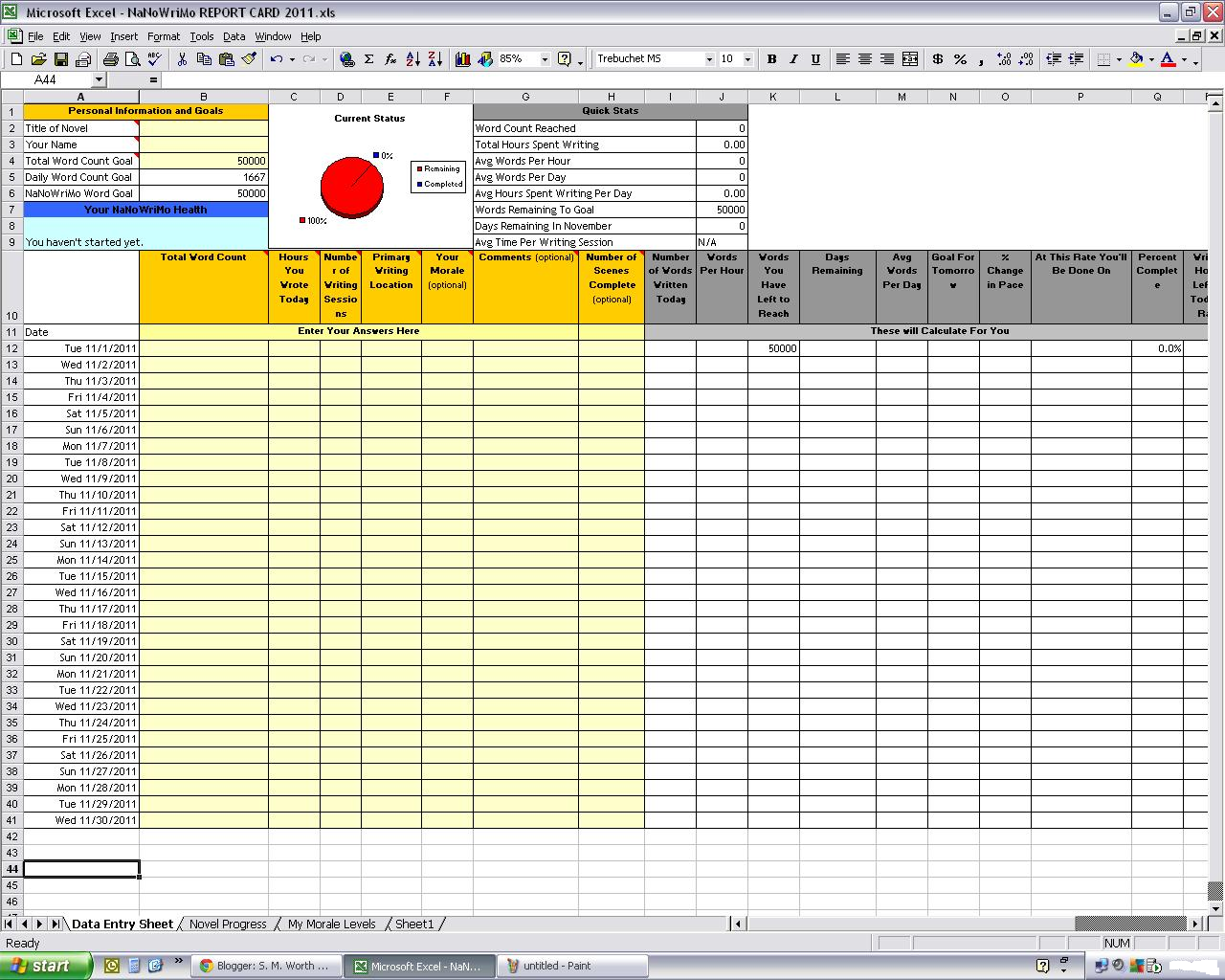
To keep with the NaNoWriMo theme, here is a simple spreadsheet for those of you that want a handy way to track your NaNoWriMo progress.

All you do is fill in the blanks of any yellow shaded areas and then the sheet will track your daily and monthly achievements for you!  Click the photo for a larger image.  You can download a copy of the NaNoWriMo Report Card here.

Don't forget to grab you're copy of Scrivener just in time for NaNoWriMo.  Use the Scrivener Coupon Code to get 20% off today and get those creative juices flowing.


You'll be able to track

  • Daily word count
  • Monthly word count
  • Number of scenes written
  • Number of writing sessions per day
  • Words per hour
  • Words left until goal
  • Average words per day
  • Tomorrow's goal
  • And much more!
I hope you can make use of it.  Feel free to change and alter as you wish.  Only one month to go.  Have fun and keep writing.


Be sure to check out Scrivener to make your life easier during NaNoWriMo Scrivener Coupon Code


Thursday

Using One Note in Fiction Writing

I like to research my ideas, flesh things out until I feel they are ready.  Yes I outline, I plan, I brainstorm, all before I finally sit down to write.  My ideas come in snippets.  A piece of dialogue, an interesting creature, a location, a scene.  I need somewhere to throw this jumble of ideas.  Before One Note these ideas filled napkins, the backs of receipts, notebooks of all sizes, whatever I could grab at the time.  I actually remember writing a scene around and around my paper coffee cup.  Truth be told, if in a bind that is where they still end up, at least until I get home.  Now every idea has its place, and if it doesn't it gets one.  I organize stories into the following:

  • Ideas
  • Outline
  • Characters
  • Locations
  • Chapters
  • Research
Many of these are subdivided into pages.  Chapters each get their own page, as do characters and locations.  I also keep different sections for Mythology, lore, fairy tales, legends and such. You can click the image for a closer look. Yes, I know if you look closely Baba Yaga is incorrectly placed under Celtic Mythology, but that's where she's staying. And that is because you can use this as you wish.  Revel in the order or disorder, whichever you are more comfortable with.  This is merely the template I use.  It is useful for me.  You may find a different method of organizing your ideas, and if you do I'd love to here about yours.  Whether it be with One Note, Excel, Word, or some other non-Microsoft software; or are you still like I was, using paper scraps and notebooks?

The screen shot to the left is a sample of what I use.  It is an older picture, but I still use the general ideas presented.  Mine has just grown larger over the past year.  I hope you find this useful to help organize your ideas and research.